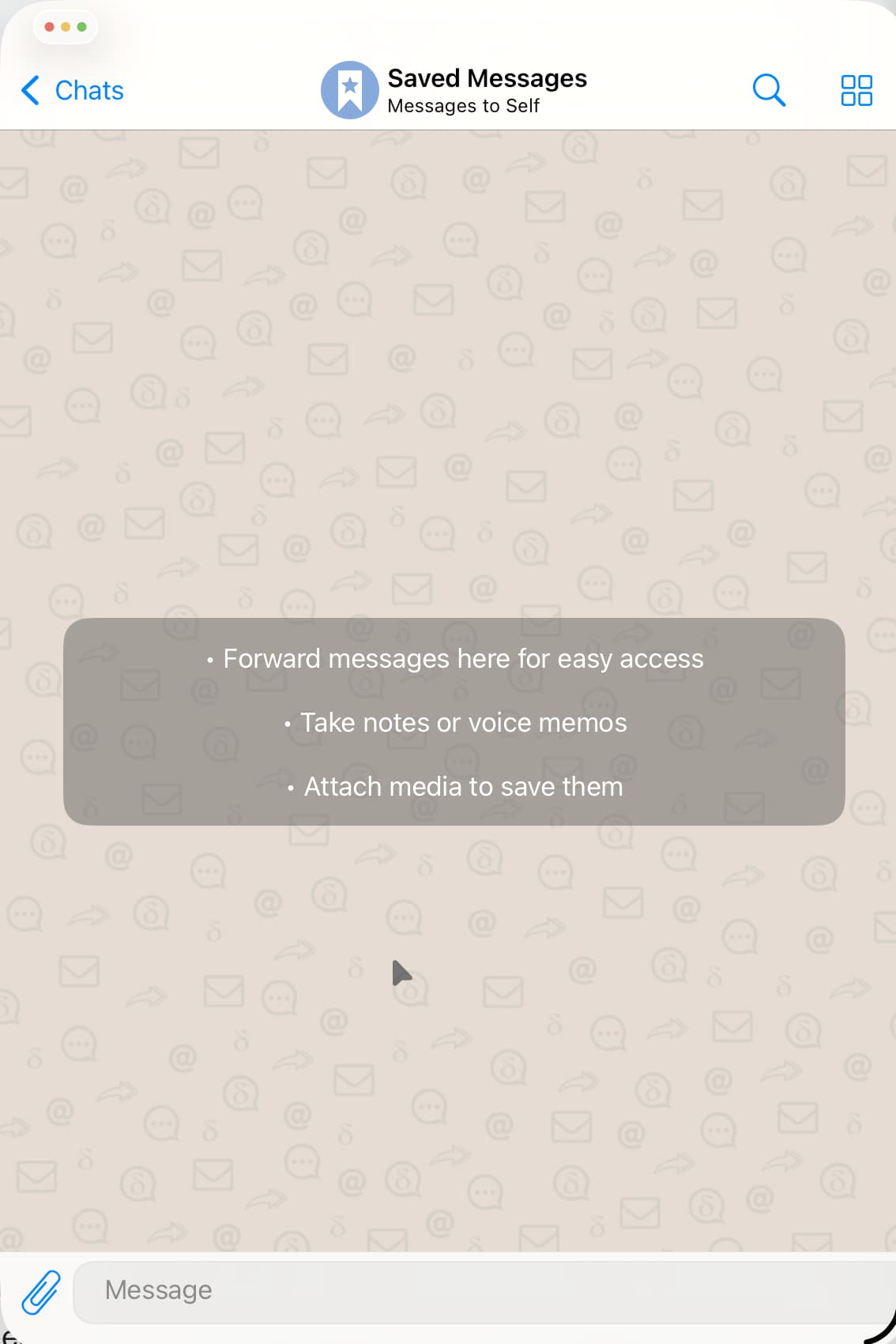
When using Delta Chat App
in iPad OS 26.1
in windowed mode
opening a chat (not after fresh start but most often later on) does not show the message entry box and / or the send button.
It seems to be related to the windowed mode on iPad OS.
Workaround is closing and restarting the Delta Chat App on iPad OS.
Screenshot will show just one example of the send message box. Here, only the send button isn’t visible. But sometimes the whole box is out of bounds, or invisible.
Thank you, @J123! That it a significant bug, even if you do have a workaround. I’m afraid it’s the weekend, so responses will be slower, but the bug report is very much appreciated.
Model: iPad Pro (12.9-inch) (3rd generation) A1895
DC Version: 2.22.1
It is not easy to reproduce it. Because it can work quite well for some time. The only clue I have is, that when the app is for a while in the background (and probably unloaded from memory) and then made active again, and another message has arrived, then it happens.
It might also have to do with the floating software keyboard and potential changes of the text box/input box then. When I unhook the iPad from the Apple Magic Keyboard, and the floating keyboard pops up, the box changes shape and position IF it was already misaligned.
I’m afraid it will be difficult to reproduce. But it happens often enough to be a little annoying.