Hello,
I am using Delta Chat Desktop 2.59.0 on macOS.
My profile is connected to a regular Gmail account using IMAP/SMTP as a classic email relay. The Gmail account is connected and the relay settings work.
I want to communicate with a person who uses Outlook and refuses to install Delta Chat. I understand that this should be possible as ordinary, unencrypted email communication.
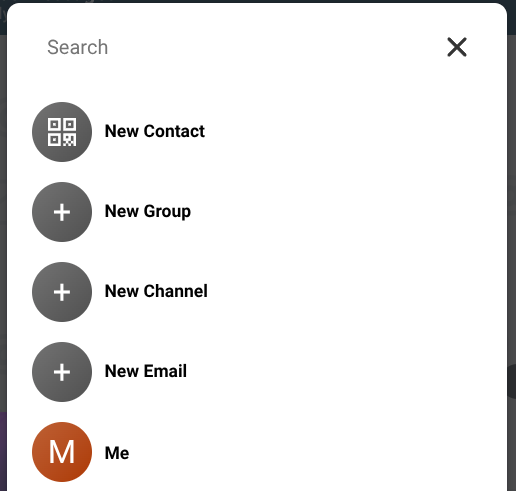
However, I cannot start a new conversation with this person:
- the interface offers only a QR code or an invite link;
- there is no field where I can enter an ordinary email address;
- there is no “Add contact manually” option;
- there is no “New email” → “Add recipient manually” option;
- disabling “Force encryption for all relays” did not help;
- the person is not a Delta Chat user, so a QR code or invite link is useless.
The Gmail account is definitely connected and visible in the relay settings.
The previous workflow with a classic email account was much more useful: I could enter an ordinary email address and use Delta Chat as a convenient chat-style email client. In the current version, this basic use case appears to be unavailable.
Could you please clarify:
- Is it still officially supported to start an ordinary email conversation from a classic Gmail relay?
- Where exactly can I enter the recipient’s email address in Delta Chat Desktop 2.59.0?
- If this functionality was removed, was that intentional?
- Is there a workaround or a version that still supports manual email recipients?
- Could you restore “New email” / “Add contact manually” for classic email profiles?
This is a serious usability problem because many contacts use Outlook or regular email and do not want to install Delta Chat. Without manual email entry, the classic email relay becomes practically useless for starting new conversations.
System information:
- OS: macOS
- Delta Chat Desktop: 2.59.0
- Mail provider: Gmail
- Relay type: classic email relay
- IMAP/SMTP: configured automatically
- “Force encryption for all relays”: disabled
Thank you.