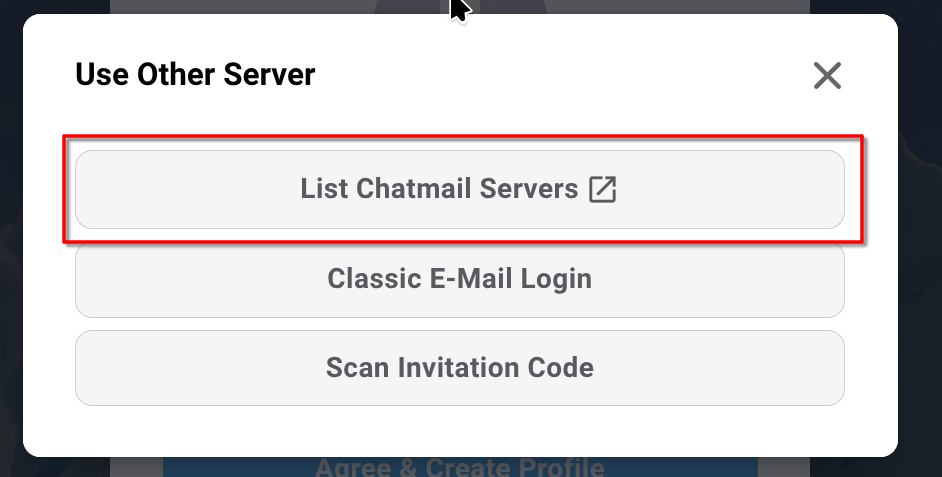
There are parts of the UI which open links in the browser without giving warning, as described on the Github:
Various runtime.openLink() calls. E.g. “What is webxdc”, “Report bugs”, “Donate”.
And even when you open DC for the first time and tap the button “List chatmail servers” it already opens a link in the browser. This is unexpected and for some users it can be annoying, especially if you use DC inside a VPN and then it bypasses that by opening links in the browser without warning.
Unfortunately this is the same with buttons like the “List chatmail servers” button, which look integrated, but surprise the user by opening a link in the browser.
I think there are two possible solutions to this problem. One solution is to warn the user before opening a link like @WofWcasaid:
Maybe an “Are you sure you want to open this in your browser?” dialog. Or otherwise making it clear that a web link will get opened.
And another solution would be to open locally cached offline copies of the pages in web view, like DC currently does when you open “Help”. This would also support the stated goal of being a “offline first” app which lets you do as much as possible offline.
Expected behavior
Integrated UI buttons do not open links in the browser without warning
Actual behavior
Integrated UI buttons open links in the browser without warning
About Desktop two of the buttons you mentioned have an icon that is also used by other apps to tell the user that it opens a web page: chatmail relay list and donate:
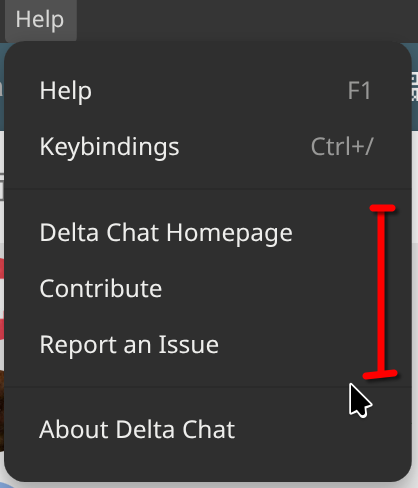
It’s also clear that the following menu items are web links:
They are separated from the other items in their own section
and the first entry says “Homepage”, so it’s also pretty clear that these open web sites in the browser.
Those links don’t contain anything personal.
If the fact that you “browse the web for delta chat related content” is already a risk to you,
then you should not just use a proxy for delta chat, but a system wide solution.
Like a system wide proxy or a VPN, which usually tunnel all network traffic of a user,
not just the traffic of a single program (in your case Delta Chat).
Could be different on the mobile apps, I haven’t systematically checked them, but I currently don’t see a problem on Desktop.
Nearly all web-links are recognizable as such, and the others are so niche that users won’t click them anyway by accident (like the ones in the about screen).