There’s a lot of questions around how to handle image compression. But why? Seemingly for 2 reasons.
Compress data to transport over a poor network.
Reduce data usage on a chatmail server
I would wager that 90% of Delta Chat users do not have network issues. So why would the app be compressing images at all by default? The answer is more likely in reason #2 above.
The delta chat FAQ says as much:
By default, compression ensures fast, efficient delivery that respects everyone’s data limits and storage.
There are such things as data limits for each user on chatmail servers. But every chatmail server I’ve seen only shows limits on the number of messages, not on the actual storage of data. It’ll say limited to 250M messages or 700M messages. What if every single message includes an image? What if that image is a file?
Two things really need clarity from a user perspective.
How much data / storage is each user allotted on a chatmail server?
How much data / storage am I currently using on each server?
Request
Allow chatmail servers to specificy data limits on users and put that in the chatmail info pages. Not just specifying number of messages per user.
Give users a way to see in the app (maybe on the multi-relay configuration screen?) how much storage they are currently using up (out of the allotted) on each server.
I was gonna add “and let the user know how much the image is gonna be compressed” but then I realized that the server shouldn’t have the ability to compress because it cannot see the content of my messages… Unless there is some dark magic that allows compression on encrypted content as efficiently.
I also just realized that the M stands for megabytes, so chatmail servers are showing how much storage a user is allotted. But users don’t know how much they’re using.
If users use almost no storage because things are mostly P2P with chatmail only as a fallback and the clients are the things saving your chats, then compressing images should not be a default at all.
Users should just see what storage is on their client(s) vs on the servers etc. If they have a bad network or want to save space, let them enable compression if they want.
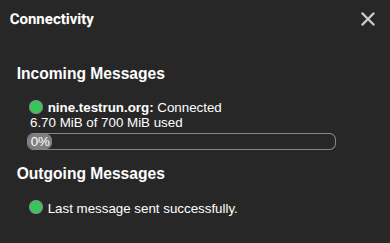
I’m having a hard time understanding how what you’re requesting is not already the case. Doesn’t the “Connectivity” dialog display exactly this? (It’s called “quota” BTW).
Let me elaborate the FAQ entry mentioned in the top post a bit more. Monthly cellular, satellite and WISP data transfer caps of an end user is what “data limits” refers to.
Even if your chatmail relay provided an infinite amount of ephemeral space, every attachment you send to your peer would still have to be stored by them forever on their constrained device (unless you remember to set up all of your chats to use disappearing messages with a short timeout).
The default software of some cameras and phones produce an image that weighs up to 10MB even if the information content that the user would like to highlight could be perfectly represented in less than 100kB with proper cropping & scaling. The situation is even worse for videos.
You gave me an idea for how this could be solved in general: