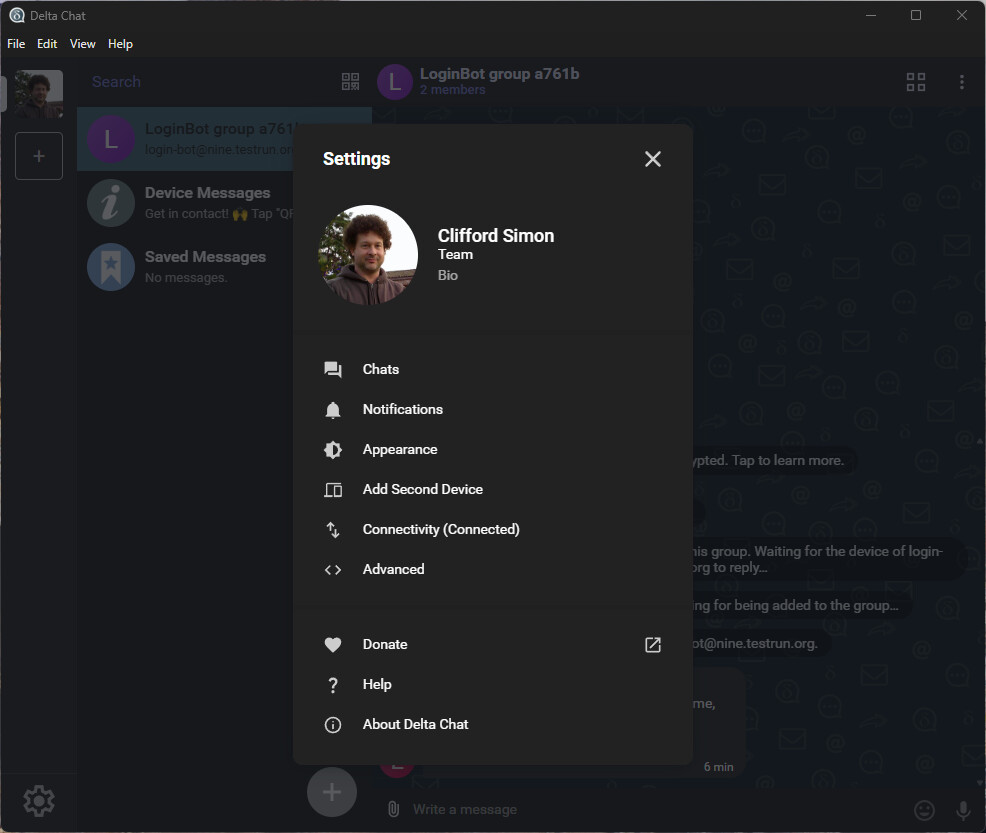
Forced into team profile [Windows]

Delta Chat version

v2.59.0

Expected behavior

During profile creation, it should create an individual profile (because I did not use the dropdown menu to ask for a team profile).

Actual behavior

I have a team profile.

Steps to reproduce the problem

  1. Install Delta Chat desktop for Windows.
  2. Start Delta Chat.
  3. Click on “Create Profile” in the dialog box.
  4. Upload my picture, enter name, and enter my choice of relay server.
  5. Click on create profile.
  6. The profile is created. Right-click on my profile thumbnail in the left-hand sidebar, ans select Settings.
  7. “Team” appears under my name.

Screen snapshots

Do other users experience this behavior? What am I doing wrong?

Hey, thank you for the report. Yes, this became known just recently thanks to @link2xt, and will be partially fixed in Desktop 2.59.1. All new profiles are created as "team profiles" · Issue #6683 · deltachat/deltachat-desktop · GitHub.

We will probably fix already-created profiles in a follow-up release. For users so far there unfortunately is no easy way to convert a profile to a normal profile (without hacking the database).

All that this “Team Profile” thing affects is syncing of messages’ “read” status between your devices.

If you can’t wait for a next release, consider re-creating the profile on another Delta Chat client, e.g. Android.

Sorry for the trouble.

Thank you for the explanation!

EDIT: I see that 2.59.1 with this issue patched, was released just about now… same day… great work. I can delete and recreate my profile and I’ll be fine.