see the changelogs at https://get.delta.chat#changelogs for details - and we again happily read your feeback here. thanks all for testing and reporting tirelessly
Multiple accounts running simultaneously on Windows and Android.
When I receive an incoming call, I immediately receive a missed call notification.
Devices: Windows 10, Samsung (SM-S908E).
Incoming calls work fine on two other devices with different accounts on one Samsung device (SM-908B).
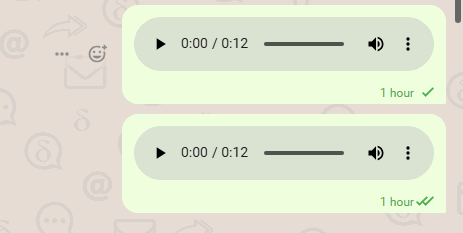
Random error I’m getting is with recording the audios. Some of them do fine, some can’t be played by both parties. It shows as zero length voice message.
I didn’t have such behavior on previous versions. I believe this started around 2.46-47, but I might be wrong.
I managed to record this behavior:
Also I have two imported relays, they are active on pc and phone two.
On PC I often get two simultaneous sent messages, one which is read and one not, doesn’t matter if it’s text or audio:
Have you been experiencing that on previous versions of Delta Chat?
Have you tried putting your Android device in airplane mode and then receiving a call?
I’ve received this message in the device message chat:
Failed to receive a message: Failed to load webxdc instance that we just checked exists: Message Msg#9024 does not exist. Core version v2.49.0. Please report this bug
Not sure how can I get more information to debug it.
Edit: I’m using deltachat and arcanechat on my mobile, deltachat on desktop and this message showed on the laptop after did a long sync since I don’t use it very often.
hi, when reporting problems it is always useful to state all the versions of delta chat of every device involved, could you please provide that info? thanks in advance
Привет нашёл серьёзный баг в delta chat 2.49 не могу ответить на входящий звонок, нажимаю ответить и ничего не происходит, не реагирует на кнопку. Могу приложить видео если нужно. android 13.
Eng
Hi, I found a serious bug in delta chat 2.49 I can’t answer an incoming call, I click answer and nothing happens, it doesn’t respond to the button. I can attach a video if necessary. android 13.
баг номер 2 не могу позванивать с Android на Windows вызов не проходит.
Eng
Bug number 2 can’t call from Android to Windows, the call doesn’t go through.
Сегодня общался с собеседником по Delta chat у него Iphone у меня Android На Android новый интерфейс звонков и он говорит что меня тихо слышно через новый интерфейс Может разработчики обратят на это внимание, На старом интерфейсе звонков который используется в Windows версии с громкостью всё нормально.
Phone/Video calls initially worked - although when connected to a VPN it would freeze every few seconds briefly. Turning the VPN off fixed this.
However, after adding extra relays, the calls are now not connecting, as soon as the person answers the call, it fails. Both ends of this issue were tested on Fairphones, running e/os on Delta Chat 2.49.0 downloaded through FDroid.
Could this be due to relay servers not correctly configuring the “TURN” server?
OK, the problem likely was that indeed one of the relays’ TURN server is not functional, and that was the one used for the call. I suspect though that what we actually want is to Calls: use all relays' TURN servers, not just one.
 https://download.delta.chat/android/beta/deltachat-gplay-release-2.49.0.apk (google play candidate, overwrites existing installs, should keep data)
 https://download.delta.chat/android/beta/deltachat-foss-debug-2.49.0.apk (f-droid candidate, can be installed beside google play)
 Join the Delta Chat beta - TestFlight - Apple (iOS Testflight, should keep data)
 Index of /desktop/preview/ (macOS, Windows, Linux)