i think they meant before joining the call, maybe like how other chat apps do it where they show you a configuration screen; to mute/unmute, select audio output/input and change/disable the camera; before you start/accept a call
sorry, I updated my comment.
I was ment:
- muteXX when users join the call → turn off camera when users join the call (usually that icon is refere to normal voice call
and video call has different icon

ps. screenshot is from telegram
- Vivo X200 OriginOs6beta(android15)
- Huawei Mate 40 HarmonyOs4.2.0
- Honor 30 Pro HarmonyOs4.2.0
- Honor V20 HarmonyOs4.0.0
- Honor V8 EMUI8.0.0(android8.0.0)
I have tested the above devices. Among them, devices 1, 2, and 3 can make video calls normally. Device 4 can also complete the call but still reports an error.
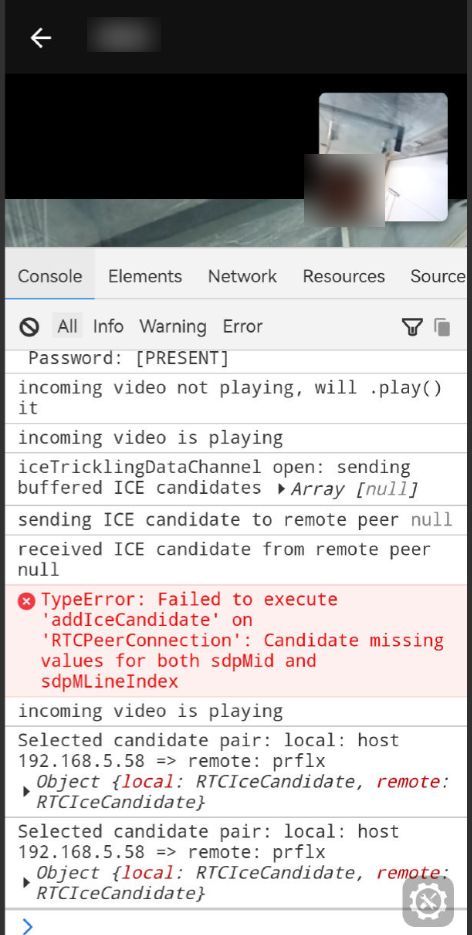
Device 5 shows a completely black screen on the call interface without any buttons, making it impossible to make a call at all.
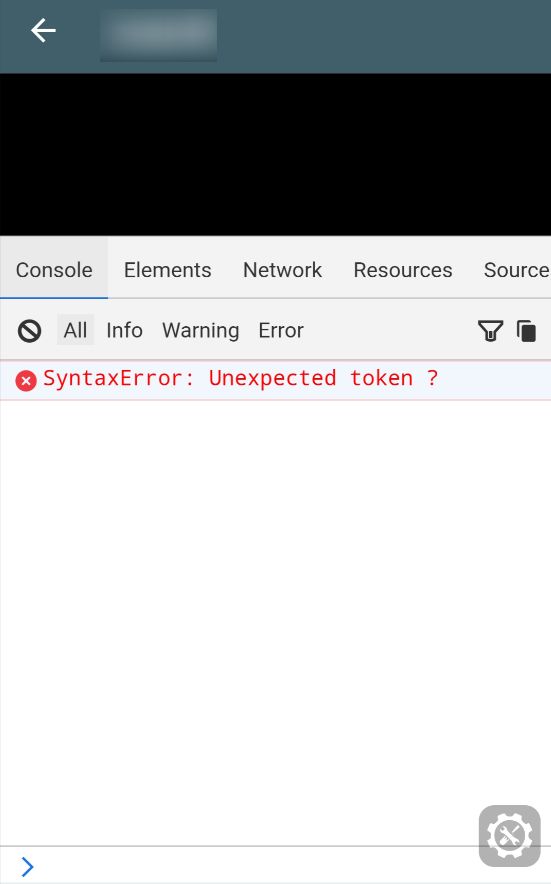
The testing environments are as follows:
- Making calls to each other under the same Wi-Fi network.
- Device 1 uses a 5G network to make calls with other devices that are connected to a Wi-Fi network (home broadband).
It seems that even under the same Wi-Fi network, the connection setup takes a relatively long time (except for Device 2, which always establishes connections very quickly). It feels like it takes around 30 seconds, so there might be room for improvement.
It would be great to add the function of switching between the front and rear cameras. Overall, the video call function is amazing! Thank you so much to the developers!
2 Likes
Yesterday I updated the desktop-tauri version to 2.22, but I couldn’t find a way to start a call. Receiving a call shows a message “Call incoming  ” but there is no way to answer the call.
In the Windows desktop version, I found this feature in the Electron build, but it is indeed not present in the Tauri build.
When I tested calling another Windows 11 PC on my Windows 11 device (both PCs have no cameras, only microphones), it worked normally. I’m quite looking forward to it—will the screen sharing feature be added later?
1 Like
Here is a message log from one of the calls where there is no audio/video transmission
 Outgoing call was accepted with answer:
SDP Call Information Summary
 Session Information:
Version: 0
Name: Default Session
Session ID: 53562967869241050
Origin Address: 127.0.0.1
 Network Connectivity (ICE Candidates):
 Local Network (Host): 2 candidate(s)
• 192.168.1.43:58769 (UDP)
• 2a01:e11:5006:6410:3c52:933f:a98c:aee9:53955 (UDP)
 Public IP (STUN): 2 candidate(s)
•(IPv4 redacted)58769 (UDP)
• (IPv6 redacted):53955 (UDP)
 No TURN relay candidates found
This may cause connection issues in restrictive networks
 Connection Assessment:
 Ok: Direct connections possible, but no TURN relay
May fail in restrictive corporate/university networks
 Media Streams:
 AUDIO:
Port: 58769
Protocol: UDP/TLS/RTP/SAVPF
Connection: (IPv4 address redacted)
Direction: Bidirectional (send & receive)
 VIDEO:
Port: Dynamic (9 = placeholder)
Protocol: UDP/TLS/RTP/SAVPF
Connection: 0.0.0.0
Direction: Bidirectional (send & receive)
APPLICATION:
Port: Dynamic (9 = placeholder)
Protocol: UDP/DTLS/SCTP
Connection: 0.0.0.0
 Audio Codecs:
• opus (High Quality): 48000Hz, 2 channel(s)
• red: 48000Hz, 2 channel(s)
• G722 (Good Quality): 8000Hz, 1 channel(s)
• PCMU (Basic Quality): 8000Hz, 1 channel(s)
• PCMA (Basic Quality): 8000Hz, 1 channel(s)
• CN: 8000Hz, 1 channel(s)
• telephone-event: 48000Hz, 1 channel(s)
• telephone-event: 8000Hz, 1 channel(s)
 Video Codecs:
• VP8 (WebRTC Standard): 90000Hz
• rtx: 90000Hz
• AV1 (Modern/Efficient): 90000Hz
• rtx: 90000Hz
• VP9 (Efficient): 90000Hz
• rtx: 90000Hz
• H264 (Compatible): 90000Hz
• rtx: 90000Hz
• H264 (Compatible): 90000Hz
• rtx: 90000Hz
• H264 (Compatible): 90000Hz
• rtx: 90000Hz
• H265: 90000Hz
• rtx: 90000Hz
• red: 90000Hz
• rtx: 90000Hz
• ulpfec: 90000Hz
 Security:
DTLS Fingerprint: SHA-256
(Redacted)
 ICE Authentication:
Username Fragment: jQBi
Password: [PRESENT]
Yes, the calls feature is not implemented on Tauri.
Edit: mostly because we just didn’t do it, but also because camera and mic access on Tauri is problematic on Linux currently.
3 Likes
Thanks!
This means that you are most likely using a server that does not have a TURN server embedded. Either it’s an outdated Chatmail server or a non-Chatmail server.
As I said, in such cases the call connection is not very likely to establish.
Also FYI you have posted your public IP addresses there.
1 Like
both accounts are on chatmail servers though, shouldn’t those work out of the box? Neither is on testrun.org fwiw
The Chatmail version that they’re running doesn’t have the TURN update.
1 Like
I’m not sure when the TURN update was merged in main, but I just updated the Chatmail relay code of the one server I control (one of the two accounts is hosted at https://sediz.iosa.it/), and there are no differences, the error message in the log is the same.
Try killing Delta Chat and restarting it, it likely remembered that the relay has no TURN. This is remembered for 7 days, so after 7 days without restarting Delta Chat will try to request it again.
I tested that the TURN server is indeed available:
? GETMETADATA "" (/shared/vendor/deltachat/turn)
* METADATA "" (/shared/vendor/deltachat/turn {58}
sediz.iosa.it:3478:1761762241:mUlsxZ1KjP5XbxEoGiydSwsgoHk=)
? OK Getmetadata completed (0.002 + 0.000 + 0.001 secs).
2 Likes
Just tested between the desktop app on Linux and the FOSS app on a Pixel 9A and it seemed to work very well.
Awesome!
It worked! Thanks to everyone who chimed in for help.
1 Like
I did some call testing, both with chatmail><classic email from android:
in most cases if I call or if they call when we respond we have neither video nor audio, just a black screen with a small square with my face taken live
pixel 7 with grapheneos (android 16)
chatmail server chatmail.woodpeckersnest.space
tried also on nine.testrun.org
1 Like
Thanks
That Chatmail server seems to not be of the latest version, see the above discussion, Help testing upcoming Delta Chat release with calls 📞! - #35 by link2xt.
And did it also not work? Please check the console, whether you see “TURN” just below 🌐 Network Connectivity (ICE Candidates):.
Developers , Can you return (at least as an option) Jitsi Call Button ? Please !
Calls are good, but limited to just P2P, for groups , I guess, it does not work. It does not work for decentralized mails, that was (and still is) the biggest advantages of the D.C.
IMHO, you are overcomplicating the Chat, making it just another chat. sorry saying that.
1 Like
hi, the button did nothing, just a fancy way of sharing a link, you can continue to share jitsi meet videocall invitations as usual, it was already weird that despite of looking integrated, the call will just open in the browser, so sharing as a link makes it clearer that it will open in the browser and also easier to share the link with others
fancy but very visual and convenient. Now all old links disappeared (pictograms) and I see just a line with https:// … , which are hard to distinguish from any other message. UX/UI is a kind of art : (