Typically the inbox would be already in use. But I think with this approach migration will work.
The problem is that while your new address is propagating to the contacts, messages from them arrive to “DeltaChat”, but you’ve already switched to watching only INBOX. If you can’t move these messages manually e.g. in webmail, they’ll be missing.
Also it’s not necessary to “delete” other devices, the relay settings are synced and as for “Only watch DeltaChat folder”, you can just disable it manually on all devices. But it’s better to have them offline during the migration. Having the only device, even for a short period, is dangerous and shouldn’t be advised to users normally having two or more.
I’m guessing the other devices wouldn’t even get the messages about the new relay.
User’s other devices will, there’s even fix: synchronize primary transport immediately after changing it · chatmail/core@58cd133 · GitHub, but currently syncing the primary relay has a bug: Setting new added relay as default fails to sync · Issue #7640 · chatmail/core · GitHub. The workaround is to change the primary relay manually on all devices, but maybe just wait until the bug is fixed.
I meant because it would go to the “Deltachat” folder but I assume that would then be turned off, sorry for being unclear.
Hi. Apologies in advance, but… I’ve read throught this topic several times, I’m still a very confused simple user of Delta Chat.
Here is my situation: I use the Delta Chat app. I have a “regular” email account that I use only for Delta Chat - although I guess I could use it for other email purposes, just never thought to do that. Using Delta Chat, I communicate with people who insist on communicating using their regular email accounts and email applications. So far this has worked fine.
Questions: Is my use case going to stop working in Delta Chat? What should I be doing so I can continue communicating with these people in the future using Delta Chat?
Thanks in advance.
If you use your email account only with Delta Chat, then you don’t need to change anything. The only change is that eventually Delta Chat will keep all messages in the Inbox and not move them to DeltaChat folder.
Hi - I’m confused and afraid (!). I use DC with posteo and my regular email address. I move chat messages to a deltachat folder and only read from that folder. I have several devices. Does this mean that when this option is removed I will start seeing all my emails in DC client also, or that DC will not work as it does not - very well, for me. ? Happy to help with the use case if I can.
Sadly, this seems to be what it means, yes. Your DC e-mails will show in your normal mail client, and your normal emails will show up in DC.
Seems like not enough people use a mixed inbox, so the folder separation feature appears to be slated for removal. So if you use a paid provider, you’d need to pay for two separate inboxes.
Hi there, I use mailbox.org as my trusted provider since many years and pay for it. They have amazing filters available so that I can have my DeltaChat emails (with dedicated alias) moved into the DeltaChat IMAP folder and use my account for normal emails as well as chatmail.
Removing the DeltaChat-folder-feature could be a reason for me to leave DeltaChat. I use it since quite some years and advertised it (successfully) to friends. A couple of recent design decisions make DeltaChat more and more unattractive though. A pity.
I’m curious, is it such a complex feature or is so much code needed to look for email in the DeltaChat folder instead of INBOX? Is there a related security concern?
Having an “IMAP folder” configuration in advanced settings next to the port is likely almost no code at all, basically a field here after “IMAP port” and then selecting the folder instead of the inbox:
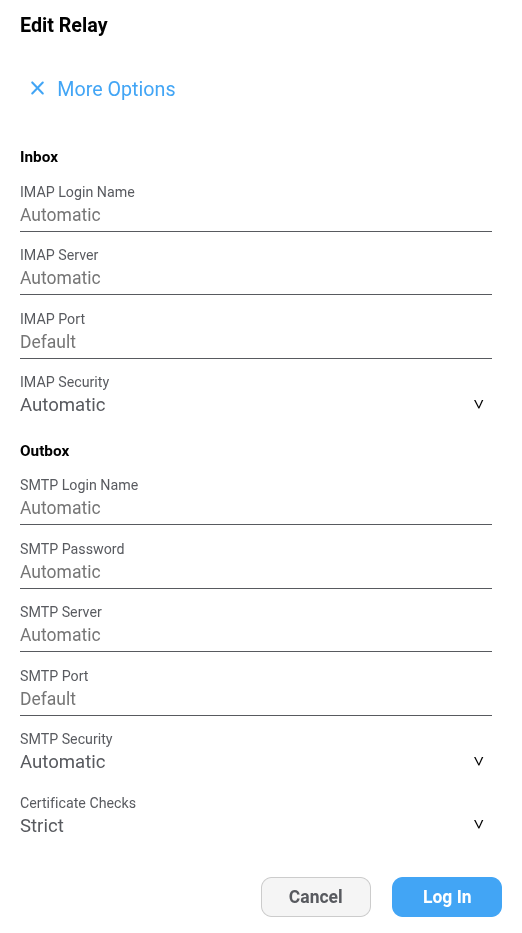
Might even be the easiest way to get rid of “only watch deltachat folder” option, migrating the configuration here into the relay settings without asking the users to reconfigure anything.
The code for listing folders, automatic configuration of folders etc. I would really like to remove because it is not tested and results in bugs due to virtual folders, folder renaming etc. that are hard to reproduce, e.g. because they require using a specific provider.
For example:
- Virtual folders may get renamed depending on the language setting in the provider: Gmail account stays "updating..." forever · Issue #6444 · chatmail/core · GitHub
- There is also no order between folders, so when you watch multiple folders, e.g.
Inbox,Sent,DeltaChat, and get online after some time, there is no easy way (or maybe no way at all if you consider that messages may arrive while you switch between folders) to fetch messages in the same order in which they arrived. Moving messages between boxes results in assigning them later UID, but keeps the timestamp, so you get different order depending on whether you sort by UID or INTERNALDATE. - Different providers use different path separator and sometimes don’t allow to create folders inside the inbox or on the top level, so you may end up with
DeltaChatfolder, orInbox/DeltaChatorInbox.DeltaChatfolder, or fail to create it at all. - Watching multiple folders at once requires maintaining multiple connections if
NOTIFYextension is not supported. Some providers have connection limit per IP, so you have failure modes where you managed to connect to theINBOXbut failed to connect toDeltaChatfolder or vice versa.
I guess if there is still uncertainty when debating the removal of this: what about setting up a survey on the delta.chat web server, and linking it during a device update text? To figure out how popular this feature is.
(I’m among those who’d use it, but I’m reading between the lines it’s unclear how many others would.)
I was going to suggest the same thing. It would get my vote given the downsides (but otherwise I’ll have to find a way to work around it, I wont stop using DC)
For met, the attraction of DC was the convenience (I know, that shouldnt win over security) and the possibility that it be attractive in an enterprise environment - no new accounts needed, no new servers, “it just works”. I casually mention this to people whenever I can.
When I started I did get the mixed chat and email issues and so started to use the DeltaChat folder option (in my client install it doesnt appear under a “legacy” heading though, just “Advanced”).
Like mailbox.org, posteo has server side filters so I can move stuff around. I don’t think Posteo supports multiple inboxes: is it even an IMAP thing - I’ll have to look at the RFT I suppose.
For folder naming issues, and subject to a willingness to maintain this feature and the code, with the attractiveness of this possibility for new users - would it be possible to let the user choose a folder rather than rely on it being called DeltaChat, at their own risk etc?
There is no such thing as multiple inboxes for the same IMAP credentials, it just means using a different username (email address) and password for chatting. Technically nothing prevents email provider from creating a new email address with a separate mailbox for existing customer and offer it for the same price (e.g. free, no additional cost) as an alias.
thanks for that clarification - does that mean that I can use e.g. one of Posteo’s email “aliases” for this? (I don’t think that means there is a separate inbox tho’).
To my knowledge you can’t, since it has no separate inbox. Unless the IMAP subfolder option stays.
I made an alias setup using mailcow (postfix-based) for testing.
Created a mailbox, let’s say user-nochat@example.org. Then created an alias user-chat@example.org pointing to user-nochat@example.org. And then created a Sieve rule:
require ["envelope", "fileinto"];
if allof (
  envelope :is "to" "user-nochat@example.org",
  header :is "X-Original-To" "user-chat@example.org"
) {
    fileinto "DeltaChat"; stop;
}
Logged in with address “user-chat@example.org” so this is what goes into the From field, but using “user-nochat@example.org” as the login. Mailcow seems to recognize that because alias exist, I can use “user-chat@example.org” in the From field.
Envelope condition is not necessary, it is only to demonstrate that envelope “TO” is pointing to the non-alias address and alias address goes into X-Original-To because of how Postfix does this.
Not encouraging anyone to make such setup, just want to see how unconfiguring such setup will work so I can test whatever instructions we give users.
As per:
There are only a couple of email service providers and each one requires a phone number to have an account. So now you’re required to either: buy another phone number, or make an email account with a different service. The second one is obvious and simple enough, but still a hurdle as opposed to “just use your existing email” (even though you still have to setup the app access). And one might not want to overshare their phone number.
So please keep the option to use the DC folder, keeping the inbox lean and clean.
By the way, are you from Russia? You can find hundreds of email providers globally who do not ask for a phone number.
The issue is with the whitelists. These providers just won’t be available to connect to.