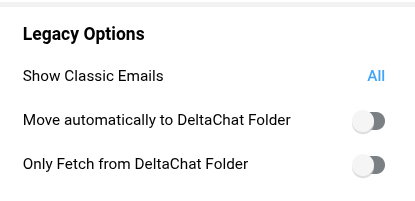
I only realized by accident in the “Advanced” menu that 1. “Only Fetch from DeltaChat Folder” is marked as a “Legacy Option”, and 2. even from that wording it wasn’t entirely obvious to me it was going away soon. Important update: read the latest messages in the thread, it’s not decided yet whether it’ll go away or get migrated to a new per-relay option.
Since this option removal might be catastrophic for some setups, I feel like a more obvious announcement would help. Or is that just me thinking that? E.g. via device messages.
Also, while I’m not telling you to keep the option, without it running DeltaChat may have significant extra cost for some people. (Since most paid e-mail providers, the ones more likely to handle DeltaChat use properly, offer aliases and server-side sorting rules which means “Move into DeltaChat folder” and the “Chat-Protocol” header are optional for mixed DeltaChat use. However, they don’t offer multiple inboxes.)
And without relays and changing the e-mail as options, the migration path is unobvious.
It is also not possible to add second relay (How to migrate your profile to another relay (version 2.33)) when these settings are set to non-default value because we want to eventually remove these options rather than make them configurable per-relay.
The reason for deprecating these options is that changing them away from the defaults shown in the screenshot is only useful for “shared mailbox” usecase where you use Delta Chat together with another email client that cannot handle chat messages (because it does not have the decryption keys, because it notifies about outgoing messages Bcc-ed to self, because it displays chats as very wide “ladder” threads etc.). If your other client can handle the amount of messages Delta Chat produces, you can keep using such setup with Delta Chat using your inbox. Otherwise, we recommend migrating Delta Chat to use a separate inbox.
The problem is mostly figuring out migration path.
As far as I understand you have your own server with a single email account and another email address that is used for chatting but does not have its own mailbox. Instead, messages are delivered to the mailbox of your first account, but moved immediately (delivered to) “Inbox/DeltaChat” subfolder. Since it is your own server, it seems you can do this:
Remove the alias
Create a new account with its own mailbox and the same email address
Now while Delta Chat cannot connect, change all “legacy options” to their defaults.
Reconfigure your Delta Chat primary relay to log into this new account
I don’t know how many users are there with a setup that requires “Only Fetch from DeltaChat Folder” we have overall. Properly setting up such setup requires being able to deliver messages to DeltaChat folder based on the Delivered-To header. Anything else, like looking at the To or Chat-Version header is not going to work as we have already moved the To header to the encrypted part (and no, filtering based on To: "hidden-recipients": ; is not a correct way to do this) and we also want to protect Chat-Version.
Best if users tell how their setup works instead of us assuming some setup that does not exist in practice, then we can figure out migration path for them.
But for your setup it seems there is a migration path, I have outlined it above:
Note that reconfiguring existing single relay without changing the address is possible even regardless of the settings and you don’t need to add a second relay for this.
I use a paid e-mail provider, like I said in the first post. My apologies for the confusion. These typically offer aliases but only one inbox. That seems like the typical use for this option.
Removing it then doubles the effective price to keep using DeltaChat.
Interesting, so it’s not fully decided whether “Only Fetch from DeltaChat Folder” is going away? I’m curious how it’ll be decided. I’d keep using it, if possible. (Not that I imagine many users will.)
if you cannot create a second mailbox on your own server, using Delta Chat on that server is not supported, we’re pretty clear on that meanwhile.
migration path would be:
set special options to defaults
add a new chatmail relay, set that as default
continue chatting in your groups
before 3. or after some time, remove old mailbox
(nb, this path should be possible always, it is an interesting property of Delta Chat, that you can continue chatting even after the fact, your old server is completely gone there are even ideas around that it can make sense to have no relay for some time )
for the initial question: the plan was always to add a device message on/before removal, see core issue, however, we did not came to that yet, and as you see, not all details are figured out
“the affected usergroup” is you as far as we known almost no one is using that option, at most 10-20 people?
I think it is clear what to do, forget about the alias address, add a new address from free chatmail relay or any other free email service and keep chatting keeping your profile, core-wise we just need to remove that options and allow people to add relays without showing an error and that is it, the main roadblock right now is core complaining about it instead of just ignoring/disabling(maybe with a device message) the options and allow you to add relay
There was another user in DC Community getting the same error on that same day, and getting puzzled by it. I don’t know beyond that! (I won’t need a migration path, I can hack around it.)
exactly! as said, probably less than 10-20 people, even 100 wouldn’t justify the effort
in the moment you add the new relay and get the warning, while you didn’t disable the server filter, yes maybe some message that just arrived at that time might get lost, you could then move it manually to the INBOX, it is not worth the effort a whole migration operation for this, time is finite and so is the life of the DC developers and there are much more important things to work on
we need to look at the big picture or we might spend our lives tweaking 1 pixel
the reality is this option is teaching us a great lesson: nothing comes without maintenance cost
we should have never added that option just for a few advanced users, the time that has been and will be spent by DC developers coding/patching and discussing in the repo, in chats, in real life discussion, and even in this thread where there are long posts carefully written by some of the main DC developers talk by its own and has costed us a lot already
the only thing we can do now is to learn from it so it is not a complete waste
Edit: nvm I think adb’s approach may work if 1. you delete all devices except one, then 2. you’re fast disabling the option and adding a new relay right after. 3. Then after some wait for it to propagate to others, you delete the old address & re-add 2nd devices.
I meant in your webmail, move the mail that was received in the DeltaChat folder after you changed DC to watch the INBOX folder, move it to the INBOX folder of that account, since after disabling that option in DC it will start watching the INBOX of that account, it should see the moved email
otherwise if you notice some message from some contact landed in DeltaChat folder you could just write to them asking to resend any message they have sent to you
 there are even ideas around that it can make sense to have no relay for some time
  almost no one is using that option, at most 10-20 people?