I tried to convince a contact to use the DeltaChat app, and I found that way to add contact is not so obvious as it should be.
Expected behavior
A newbie installs DeltaChat, adds profile. As part of profile creation flow, or via link in Add contact screen, or both ways, right in the app shows and explains in detail how to add contacts with all possible ways:
- via qr code scanning
- via sending the link, For this way it should explain can I share this link via software that fetches link preview, such as Whatsapp or Fediverse? Or the link is one time?
- If I add to contact in the DeltaChat app by starting chat with compatible email address (hosted at Chatmail servers?), it should perform some establishing of encryption automatically (or by showing confirmation UI and do it on confirm) by sending some appropriate message of “I added you to my contacts, I use ChatMail compatible software and here is my key data” kind.
Actual behavior
Currently I just see an unusable notification about need to establish encryption
Example Images
How it appears now

How it can appear after possible update
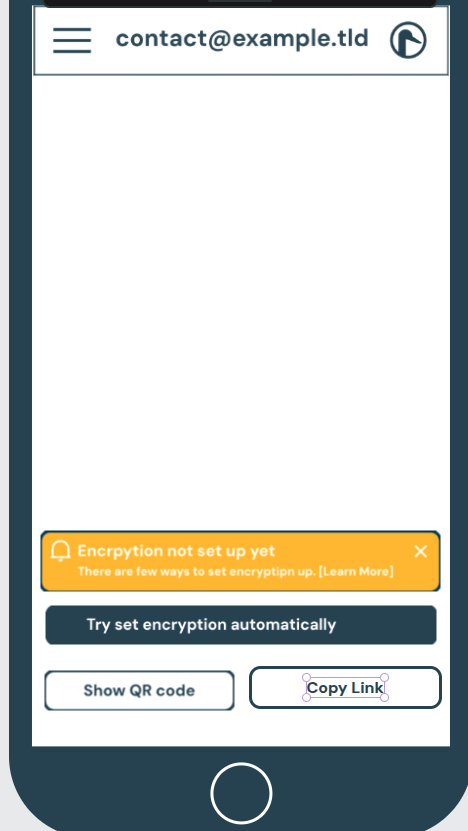
Idea is to give ways to setup encryption right in the chat, when confused people new to Delta Chat “added” contacts by simply typing in contact email and trying to start the chat right away.
Including more or less automatic way after confirmation if contact recognized as “ChatMail compatible” by sending special message of “I use ChatMail Compatible client, I added you to contact, here is my key data if you want add me to contacts, use it please to setup encryption”.
