9er
September 3, 2025, 11:01am
1
AFAIK this is already in the core:
main ← sadraiiali:main
opened 07:07PM - 10 Jul 25 UTC
### **Description**
#### **What does this PR do?**
This pull request adds … the complete logic in the `core` library to allow users to set a custom display order for their accounts. This is the foundation for the upcoming UI feature in the desktop client, which will let users reorder accounts using drag-and-drop.
related -> https://github.com/deltachat/deltachat-desktop/pull/5279
This PR handles saving, retrieving, and managing the account order.
#### **How It Works: A Detailed Look**
The account order is stored as a list of account IDs in `accounts.toml` under a new `accounts_order: Vec<u32>` field.
* **Backwards Compatibility:** The `accounts_order` field uses `#[serde(default)]`. This ensures that if a user updates from an older version, their existing `accounts.toml` file will load without errors, and an empty order list will be created.
* **Setting the Order (`set_accounts_order`):**
* This is a new public method that takes a list of account IDs (`Vec<u32>`).
* **It is robust:** It cleans the list by removing any IDs that don't match existing accounts.
* It also ensures completeness by automatically adding any existing accounts that were missing from the provided list to the end. This prevents any accounts from being hidden.
* **Getting the Order (`get_all` and `get_accounts_order`):**
* The `get_all()` method is now the main source for getting an ordered list of accounts. Its logic is:
1. Start with the user-defined `accounts_order`.
2. Remove any IDs from the list that no longer exist (e.g., deleted accounts).
3. Add any new accounts (that are not yet in the order list) to the end.
* The old `get_all()` behavior (returning an unordered list) is now in a new method, `get_all_unordered()`, to avoid breaking any existing logic.
* A new, clearly named `get_accounts_order()` method is also added, which simply calls `get_all()` for simplicity.
* **Keeping Order Consistent:**
* `add_account()` and `add_closed_account()` now add the new account's ID to the end of the `accounts_order` list.
* `remove_account()` now removes the account's ID from the `accounts_order` list.
---
### **File Changes**
#### **`api.rs`**
Two new methods were added to the JSON-RPC API to expose this feature to clients:
* `async fn set_accounts_order(&self, order: Vec<u32>)`: Receives the desired order from the client.
* `async fn get_accounts_order(&self) -> Vec<u32>`: Returns the current, correct account order to the client.
#### **`accounts.rs`**
This file contains all the core logic for the feature:
* **`InnerConfig` Struct:** The new `accounts_order: Vec<u32>` field was added to store the order.
* **New Methods:** `set_accounts_order`, `get_accounts_order`, and `get_all_unordered` were added.
* **Updated Methods:** `get_all`, `add_account`, `add_closed_account`, and `remove_account` were modified to correctly manage the `accounts_order` list.
---
### **A Note from the Author**
This implementation was created with AI assistance, and I am still learning the Delta Chat codebase. While I have reviewed the logic, I might have missed some details or side effects.
The changes pass the local tests using the command:
`cargo test --lib accounts`
I have a question for the team:
**What other parts of the project might I need to change?** For example, are there other test suites I should run, or other files that might be affected by this change? Any guidance on the next steps would be greatly appreciated.
----
but UI is still not there.accounts_order: Vec<u32> field should look in accounts.toml, so I can edit the file manually and set the order of accounts?
[[accounts]]
id = 1
dir = "f16d537c-4fde-4f5e-b600-763685011ec3"
uuid = "f16d537c-4fde-4f5e-b600-763685011ec3"
accounts_order = 2

[[accounts]]
id = 2
dir = "25e52fb2-f46b-4206-8fd1-bdab9693c2f3"
uuid = "25e52fb2-f46b-4206-8fd1-bdab9693c2f3"
accounts_order = 1
1 Like
link2xt
September 3, 2025, 11:39am
2
Add accounts_order = [2, 1] as the first line of the file.
3 Likes
r10s
September 3, 2025, 8:50pm
3
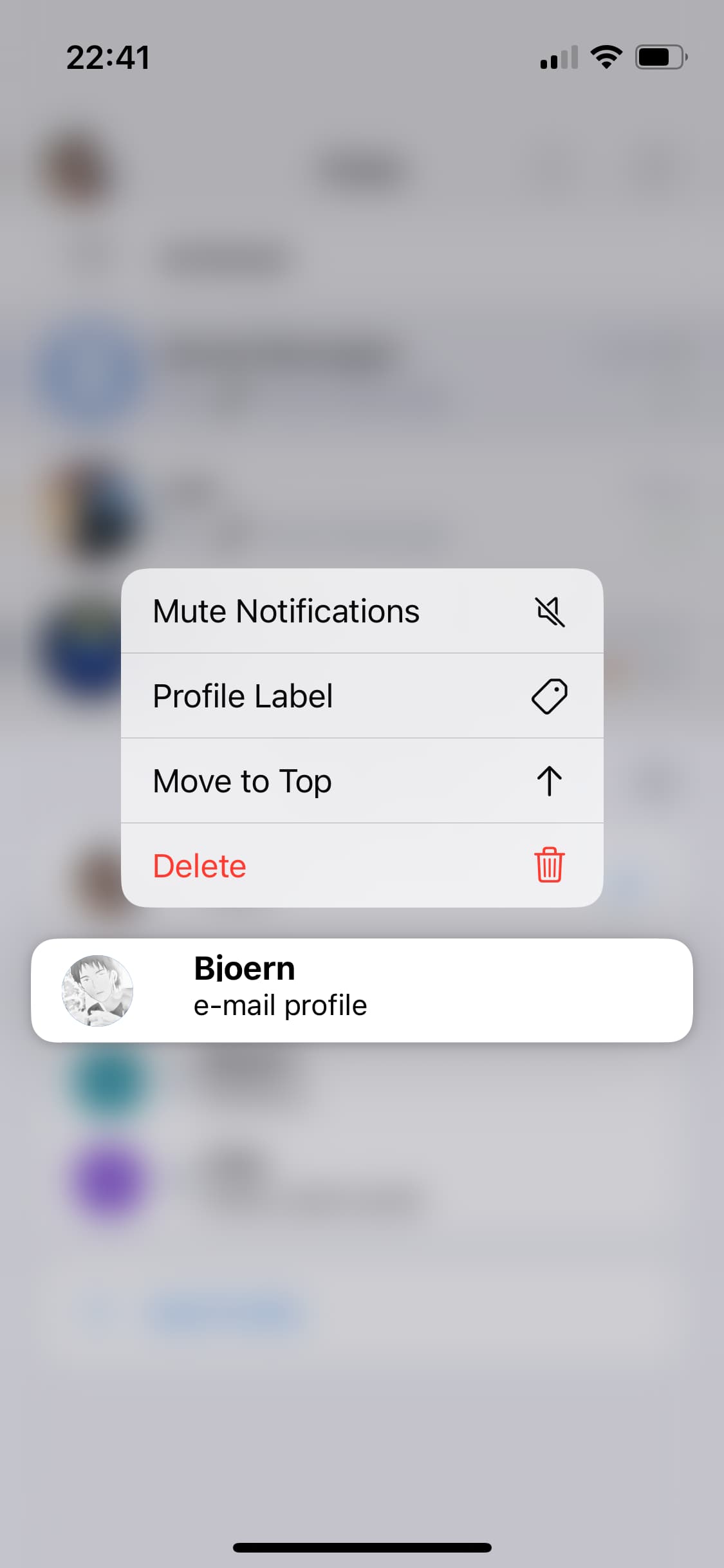
ftr, Android and iOS have options to change the order of profiles.
for that, long-tap a profile in the profile switcher eg, on iOS:
2 Likes