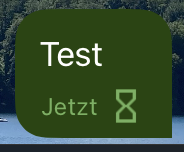
All Delta Chat UIs currently show a spinner next to the queued animated messages. Here is a screenshot from Delta Chat Desktop 2.35:
Once the message is sent, it is replaced with a single checkmark.
The problem with using the spinner next to queued messages is that UI does not know if there is any progress actually being made. Spinner is displayed even if if there is no network, so if you post multiple messages, you get an animated spinner next to each message while only one message is currently at the queue head and no message is sent over the network as there is no connection.
I have checked that Signal does the same and displays the same spinner while I’m offline, but I still don’t think it is a good design. It discourages sending messages while being offline because it looks like the app is doing some busy work and (on a phone) will drain my battery trying to send the message while in fact the only difference is that it will try to establish an SMTP connection with some backoff, but it already tries to do it for IMAP.
Don’t know what is a better indication, but both not animated spinner (dotted circle) and an empty checkmark with an explanation in FAQ look better to me than the current animated spinner.
discussed a bit internally, seems also sort of animation might be expected - the message is not done, and it is also true, that the app does things to get it out, even if not at every second and not for all messages at the same time - but most ppl would not care about these details. but maybe expect some animation as they’ve learned that from other messenger … but then, most other messengers are not offline first.
still, it is not that clear.
actionable outcome, however, is to sync appearance on all UI. as the current iOS hourglass might be regarded a bit outdated 90’s windows style, maybe try to to have smth otherwise unanimated on iOS, and let’s see if ppl complain that there is no animation
as you said, most other apps do the same, in DC android it actually stops spinning after some seconds, I don’t think most users think the app is “doing busy work” if they send messages while offline just because there is a spinning wheel, that is how it works in all other platforms, in any case this is not a problem at all, worse case a nice surprise that it doesn’t drain battery if someone might think so, but I don’t think most people ever think too much about it, to me it has always meant in all other apps where I saw it “I am offline so the message is pending”, most users don’t understand much of the internals to even think there could be “busy work” going on, I have never ever seen anyone complaining of the spinning wheel, if anything I remember there where complains because the spinning stopped in some circumstances and it looks like frozen/stuck, I don’t think there is nothing to do here, except to make the icon in iOS app look the same as on the other platforms
Personally I never worried that the app was doing busy work when I saw the spinner, but I have sometimes wondered if maybe the spinner should be displayed again when you edit a sent message to indicate if the edit was sent or still sending.

 like iOS has?