I have an account from nine.testrun.org that is connected to two devices, Android and Desktop. My chats are set to disappear “after 1 hour” on both devices.
What happened
I happened to be away for few days, so I didn’t open the desktop app for few days. when I opened the app today, tons of messages started to pour in. the messages that should have been long long gone, because they should have been already deleted from my phone, the phone of the people I chat with, and chatmail server. and yet, there they were, pouring into my desktop client.
The burning questions
Where the chats are stored and fetched from?
Why are they still accessible even after the set disappearing time?
The backend is a mailserver. So if you have only one device, then by default, it deletes the messages (e-mails) from the server when it downloads them. If you have multiple devices, then by default, it leaves a copy on the server so that the other device can download it too.
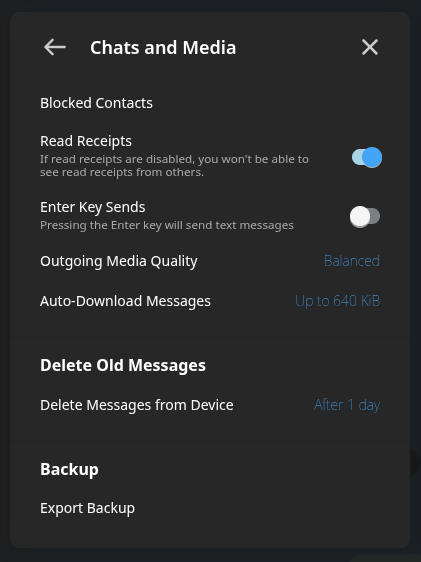
These defaults can be changed in the settings. Next to the “Delete messages from device” setting, which you have set to “one hour” (measured from when you see them, so you don’t miss messages when away for a few days), there is a “Delete messages from server” option, which you have set to “Automatic”. You can instead set it to “At once after download”.
Note that Chatmail servers, quite separately, delete messages older than a certain limit. 30 days is a typical limit, but see the server’s homepage. It may be as short as three days on some servers.
If you have multiple devices, then by default, it leaves a copy on the server so that the other device can download it too.
Does it mean that if there are 2 devices registered for that account, the message will be deleted from the server when it is received by all the devices of that account?
Next to the “Delete messages from device” setting, which you have set to “one hour” (measured from when you see them, so you don’t miss messages when away for a few days), there is a “Delete messages from server” option, which you have set to “Automatic”. You can instead set it to “At once after download”.
I don’t see such an option neither on Android client (v2.34.0) nor on the desktop client (v2.35.0):
the “Disappearing Countdown” does not start from the time the message is sent.
the countdown is started individually by each recipient and by each device, once the chat is opened there.
once, the eg. “1 hour” has expired, on that recipient’s device, the message is deleted. moreover, it is scheduled for server deletion for that recipient.
for efficiency, the server deletion is not executed at the same moment, but server deletion may be delayed for several hour (on purpose, the server itself does not know anything about if the encrypted message is disappearing or not)
putting all that together, in a multi device setup, it may totally happen that User A get messages deleted on one Device A, later on Device B - as well as User B may get and delete the messages even several days later.
this is how it is supposed to work, your “days later things appear” may happen as the first device got offline before deletion on server took place. we would need more information and a reproducible setup to judge that. apart from that, maybe it would also be better to recognise that the message was seen already, and remove it immediately then.
eventually, however, everything’s should be deleted