I was thinking about making a “share location” app (maybe without drawing an actual map, so that people can find each other when they’re close by), but it turned out that the Geolocation API is not accessible, at least on Delta Chat for Android and Desktop.
I think given the nature of webxdc (no way to “phone home”) people are much more willing to give the app access to such API compared to regular websites, it would be a shame for webxdc to miss out on such powerful features.
Yes, it appears that on mobile the entire Delta Chat app would need to be granted such permissions in order to grant them to a webxdc app. Here’s a Stack Overflow question about it.
Also it appears that on Desktop the apps are not in a secure context Update: no longer the case after this MR. Certain APIs (e.g. Geolocation, Storage API, Device Orientation, Web Crypto API) are not accessible in non-secure contexts.
Also the fact that we’ve recently started to wrap the apps in <iframes> might be a concern, but not sure.
I have a concrete proposal on how we can move forward with this in DC Desktop.
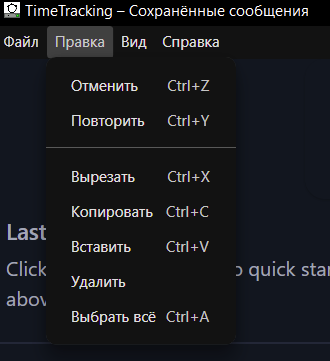
Let’s introduce an experimental toggle “Manage webxdc App Permissions”. When enabled, we add a “Pemissions” submenu to the “Edit” menu of the webxdc window that is going to list the permissions as checkboxes, similar to the “Float on Top” checkbox.
No need to think about popups and dynamic permission requests like on Android. Just simple checkboxes.
Good idea, though should be set for each webxdc instance and a confirmation dialog allowing the app to ask for permission still makes sense usability wise.
You could copy-paste your satnav co-ordinates into an app and get a spatial map, or into a bot and get OSM tiles, and add the app to a chat with the bot to get geolocation. This limited geolocation might actually be useful for teaching mapreading.
Microphone access can be useful for many things. For instance, I have an app to train reciting in mind. With the current situation, people have to record the audio in other apps, then upload it through the mini app which is a bad UX.
You don’t want someone to send you a modified version of the editor app that will secretly spy on you using the microphone permission.
The difference is that you may trust Delta Chat not to abuse your mic, but you can’t trust every WebXDC app with that.
I’m so confused by this mentality. Do you trust Delta Chat or do you not? If not, stop using the app. If yes, then the webxdc apps are equally as safe as the Delta Chat app itself.
Also, if the webxdc sandbox is compromised, “permissions” do not help you one bit. Congrats, you just approved the app to leak your nudes lmao.
How is that so? Delta Chat is made and signed by the developers of Delta Chat, approved on Google Play and built on F-Droid machines. A WebXDC app can be made and sent by anyone who has my Delta Chat contact.
We wouldn’t need the entire “sandbox” thing then at all, just let the WebXDC apps do whatever.
Because Delta Chat is the one that put the webxdc sandbox in the app. If you think they put a back door in the sandbox for webxdc developers to exploit, why are you even using Delta Chat?
Yes, and it runs inside Delta Chat’s sandbox. If you trust Delta Chat’s sandbox, then nothing more needs to be trusted. If you don’t trust Delta Chat’s sandbox, then just stop using their app.