Sometimes I am reviewing the conversations in some chats, and for some reason I must leave the chat, and I hope that when I return to the chat, I can continue reading where I stayed, but on the contrary, the chat automatically returns to the beginning, and I have to search manually where I stayed, wasting some time.
So:
I recommend keeping the chat reading status, unless you find new messages.
(probably not a good idea) Just don’t un-render the message lists of other chats, so that the browser is the one keeping the scroll position. Similar to how tabs work in browsers. This is probably gonna be problematic, e.g. we would have to make sure not to mark messages and not to scroll as read as they arrive to the non-current chat.
When closing the chat, simply find the last message whose bottom corner (or top corner?) is visible. When you go back to the chat, jump to that message (unless we are explicitly provided another message to jump to, e.g. through notification click).
apart from that, at a first glance, i see a worsening for the majority of cases, where, if you leave a chat, you will want to forget about scrolling position, esp. if you open the chat hours or days later. esp. if additionally new messages arrive - where to scroll then?
sure, we have the scroll down button, and the logic can maybe be more smarter than “persist positions of all chats” but all in all that makes chat opening unpredictable. not to speak about larger complexity and maintaiinance costs.
also, when searching a along time for some message you want to remember the next days: sometimes you do not even know the chat, so that would not help at all also, there is multi-device.
so, all in all i am not sure if targeting this proposal would overall be a win, even if technically super-simple to do.
another approach, that works today, targets the case of “chat forgotten” and “multi device” as well - and that was not possible the time the proposal was filed (note, that this issue is quite old, lots of things has changed since then):
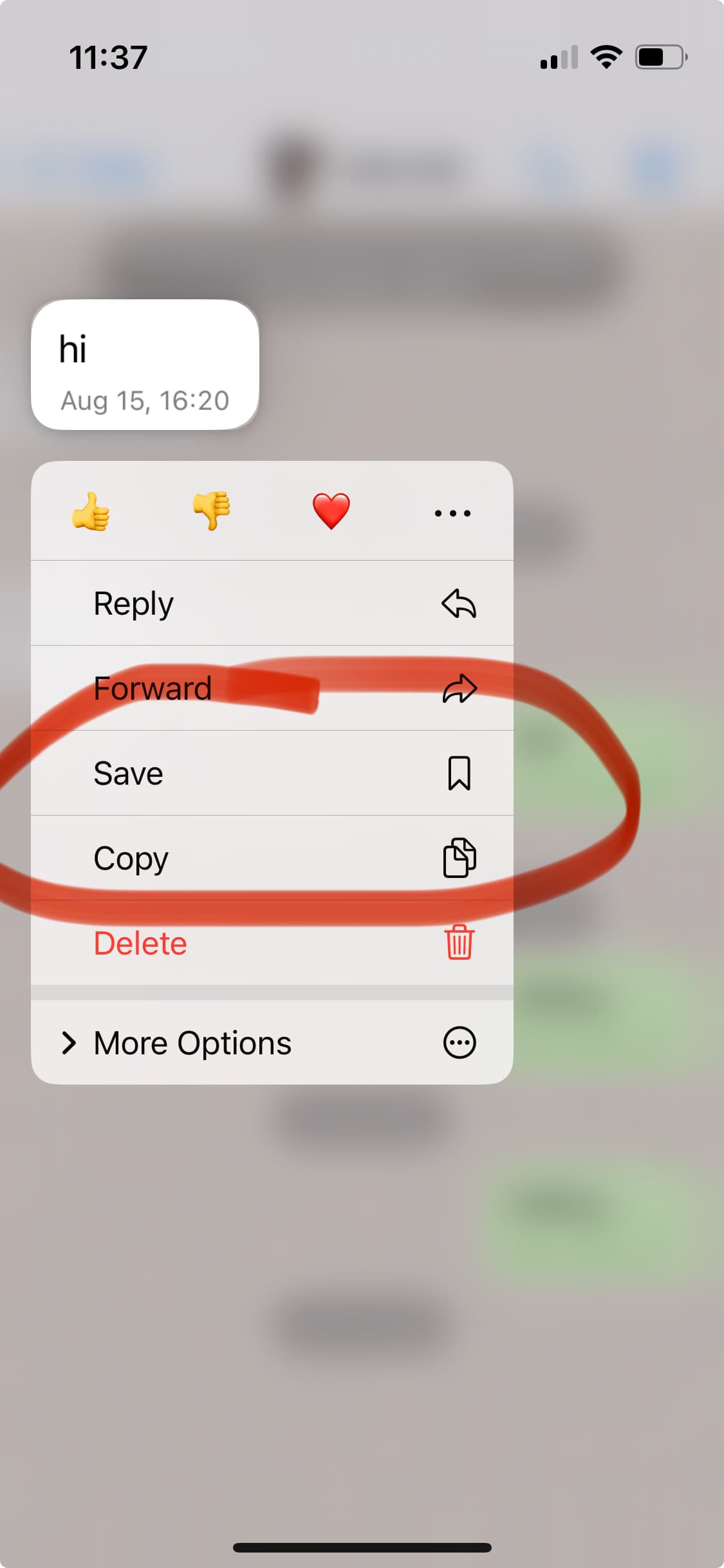
if it was really hard to din the the message or position: “Save” it to “Saved Messages” - that way you can easily go back to the exact position in the correct chat at any time with one tap
answering myself: none of WhatsApp-iOS, WhatsApp-Web, Signal-iOS, Signal-Desktop, Telegram-iOS or Telegram-macOS persist the position for private chats. Telegram seem to do this for “Channels” esp. the latter is interesting as Telegram decided not to do that for private chats even though they have implemented the logic.
I did only a quick testing round, so it may be inaccurate, also not sure if some things were bugs in apps
We might want to “forget” the old scroll position after a while, but IDK if it would be better. Could be perceived as inconsistent maybe.
If you previously had the chat scrolled up, then scroll to the old position. Otherwise (if you had it scrolled to the bottom), then scroll to the first unread message (as we do now), which is also basically almost equivalent to restoring the old scroll position.
But we can look up how Telegram does this precisely.
What’s unpredictable about this? You continue where you left off, that’s it. Like opening a book on a bookmark.
Sorry, I didn’t get this.
Are you saying that in this case the purpose of the feature at hand is to “save a message” for later? I wouldn’t see it this way. It’s more about switching between chats rapidly.
Sure this is a nice feature, but a distinct one. You wouldn’t want to “save message” every time you’re reading through one chat, and then have to switch to another to reply real quick.
Sometimes there is a high-traffic group chat you want/need to follow, and after some offline time you can’t read all the new messages at once. Then it’s very convinient to start from last read position.
Useful feature, which I discovered only now.
Once again, DC interface is misleading, for me at least. It believe it should be named ‘Bookmark post’ or just ‘Bookmark’, but not ‘Save’.
I agree with this. In my view, saving/bookmarking a message for later is designed for a different use case to switching between chats and wanting to keep your position in the chats as you switch between them. The “Save message” feature can be used as a workaround for the second use case but it’s not ideal. It means that instead of switching between two chats, you would now need to switch between three chats with the “Saved Messages” chat acting as a go-between, which is an unintuitive workflow, requiring more time and concentration.
It also greatly increases the number of taps/clicks which you need to make to switch between the chats, and you end up with many messages cluttering your “Saved messages” chat which you probably didn’t want to save, unless you then take the time to remove them later.
I like the “Save message” feature, and it can be used as a workaround in this case, but I don’t see it as a replacement for remembering the last read position in the chats.
For what it’s worth, I would also find it very useful if chats remembered the last read position, but it’s fair that developers might want to prioritize other things first.
Well it acts as a bookmark and saves the message, so both terms are accurate. The saved message is kept even if the original is deleted. I guess “save and bookmark” would be more descriptive but maybe people find that too long. The icon implies bookmarking.
Use cases: If I am reading a long message and get a message on another profile that I need to answer promptly, getting back to what I was reading takes forever. If I am reading throgh a long backlog of unread messages and leave the chat to answer on another profile, finding my place again takes forever, and I have lost the first-unread marker.
I would like this, especially if the old positions were lost each time I closed the app, for privacy.
Switchable shortcuts or defaults to last-reread and first-unread are another possibility. I’d prefer defaulting to old position than defaulting to first-unread, since, as @WofWca said, it would usually be equivalent, and when different old-position would be preferable.
Currently, when there are no unread messages, it defaults to the bottom of the chat, which is easy to find anyway, and is usually also my last position.
In case you are still using DeltaTouch: The next version will only mark messages as seen that you actually saw, and jump to the first (oldest) unread message when you enter a chat.
I am! I apologize for the lack of user testing recently, I’ve just been unavoidably busy with other things. Looking forward to the new scroll-position UI.
 Sometimes I am reviewing the conversations in some chats, and for some reason I must leave the chat, and I hope that when I return to the chat, I can continue reading where I stayed, but on the contrary, the chat automatically returns to the beginning, and I have to search manually where I stayed, wasting some time.
 I recommend keeping the chat reading status, unless you find new messages.
 also, there is multi-device.