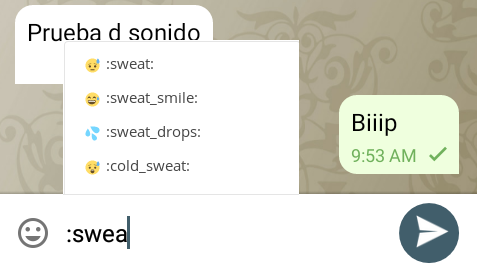
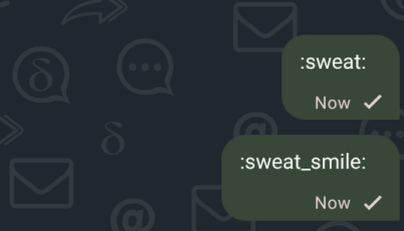
I am not an emoji expert, most of the time I avoid to use most of the emojis because I don’t know what they mean, having the emojis labelled and accessible by triggering autocompletion on “:” would be useful, also as a way of quickly finding the emoji you are looking for.
I’ve had multiple fresh users, especially non-techies, get stumped by this with DeltaChat desktop and get annoyed by it. So this seems to be a fairly high impact issue.
Yes, please! This is currently my biggest downside from using DeltaChat (which I guess it is good news if we are already here!).
This is not even about the “not knowing what emoji I want from the icons”, but rather it’s just that this system is way faster on desktop in order to find any emoji at all, as there is no “emoji picker” that substitutes your keyboard right where your thumbs are.
Even WhatsApp, which is not known for being very feature-complete, has this feature on desktop.
I would make this a feature for both mobile and desktop applications, although clearly it is way more useful on the desktop.
When this is added, it would be good to have it optional (can be preset to “On”; the important thing is that it is easy to deactivate).
I much prefer text-based-emoji, and almost never use image-based emoji.
It is annoying when an app shoves random emojis in my view; it interferes with my ability to focus on the discussion. This happens very often when i use FluffyChat, which does emoji-autocompletion, and has no option to deactivate that. Simply typing :D in a message, fills the entire screen with suggestions that i do not want.
still, devs generally consider “emoji autocompletion and suggestions on input” as useful. however, it is not done yet as it was never prioritised over even more important things
no need for any option for this, what we are talking about here is emoji auto-completion, not replacement, if you type :D or :cat: it will not be replaced, it is about getting suggestions, it is up to you to use them or not
I understand that i will still be able to write those normally in Delta Chat then. My point is, that the suggestions being shown to me, without considering my consent, is a problem; and an option would be sufficient to solve that.
One example of the issue: The app i mentioned before, flashes “depressive” with a relevant emoji, into my view, when i try to express that i am cheery about something by writing :D, which immediately ends the good mood i then had, if i see it.
Another issue is, that there are lots of other “suggestions” in that case too, so many in fact, that the entire vertical height of the chat is blocked, preventing me from (re-)reading the messages there (wether it is a new message, or i need to double check something), until i close it somehow.
A simple alternative to this might be a keyboard shortcut that opens the emoji selector. It’d do mostly the same thing (hit key, search, enter to select emoji) but with a minimum amount of new code.
Huh, I didn’t think about just..tabbing around the interface. That actually works better than I expected it to! It’ll even find faces like :- ) and D: because of the way the emojis are tagged. It does feel a little clunkier than auto-searching, but not by a lot, and not enough that it’ll slow down my typing by any significant amount.
EDIT: Discourse is really aggressive with it’s emoji auto-replace apparently.