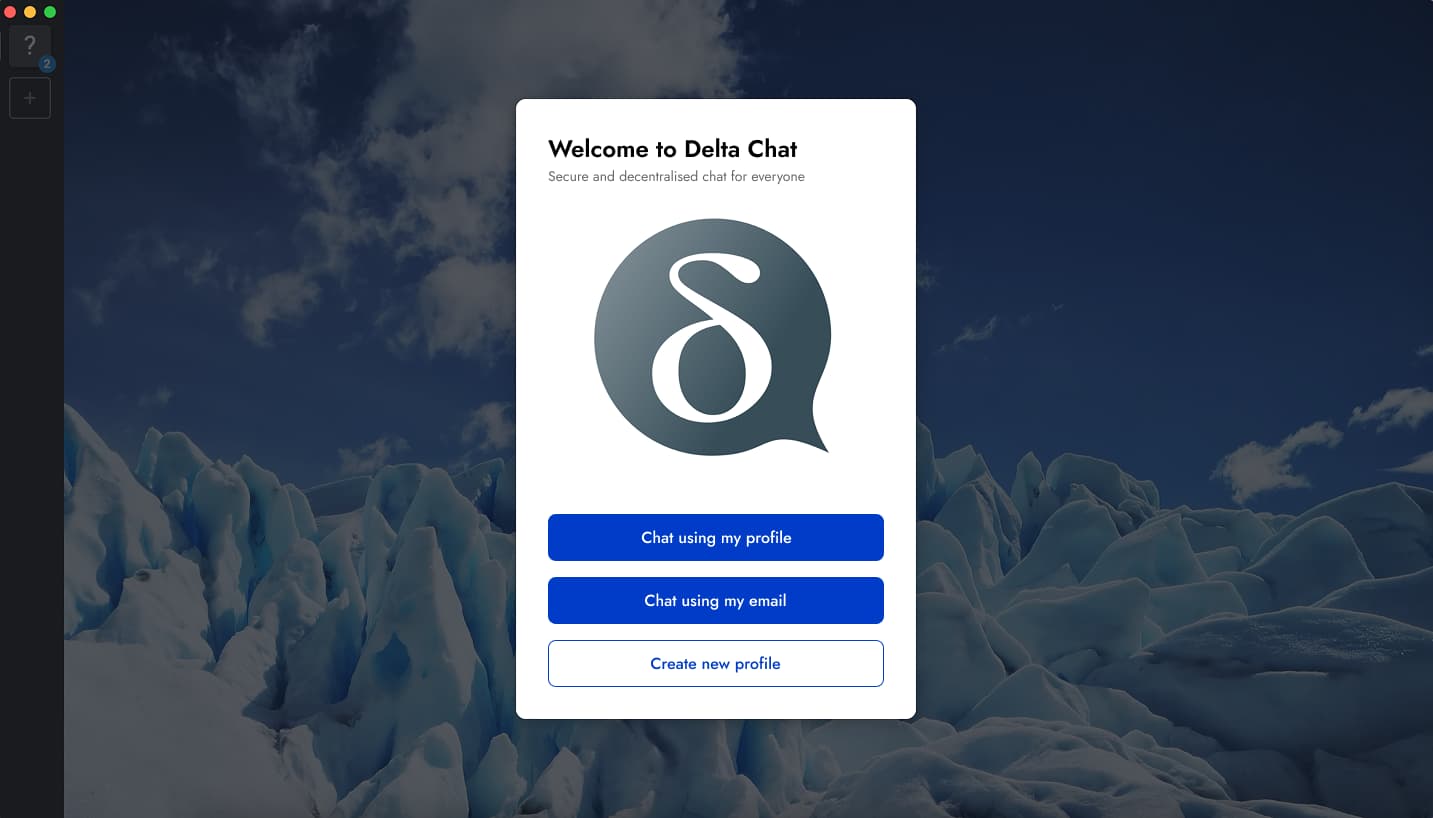
Streamline user journey when accessing Delta Chat using an existing email.
Autofill functionality
Is it possible to autofill the imap/smtp settings based on the email domain?
So that if I use Mailbox, Posteo, Gmail, etc… those values are automatically loaded (possibly not even visible to users).
Obviously this would not work for personal domains.
Gmail and adoption
Gmail onboarding is currently really technical, can that be done similar to a “normal” email client?
In Mozzilla Thunderbird is quite easy to add a Gmail account… few verifications from google, then the classic imap/smtp settings.
Streamline boarding of Gmail users will immensely increase the adoption!!
(I really want to chat with my friends)
Expected behavior
When I first open Delta Chat,
I want to easily find a way to access it, using my exiting email address.
And when I click on “Access using my email”,
I would like to go trough a quick wizard where I only enter my email address/password.
And settings would automatically be applied based on the email domain,
So that I can chat with my friends with no hassle.
Actual behavior
I currently need to click multiple times to access this function, and it is not intuitive.
Click on “Create new profile”… (why? I don’t want to create a new profile, I only want to access the chat using my existing email)
Click on “Use other server” (what that even means??)
Then I have to click “Classic email login”.
Then I am asked to make some settings that I don’t understand.
hi, welcome, we don’t plan to invest too much time in the “use Delta Chat for unencrypted emails with classic email providers” use case,
this is just a biased point of view, they are not creating an account, they don’t have to care about user and passwords, they just set a name, the same way they will need if they use a classic email account, which involves several other steps, if at all they manage to get it working, because email providers like gmail makes this extremly hard or just impossible
the main complain is “oh I need to install yet another app” not “I can’t use my email address with it”, in fact most people will be skeptical “why this app wants my email password to be able to register”
so better just tell them they don’t need any account to use the app, and be lucky if they want to install an extra app at all, otherwise, they will only use their existing email app, and it is you the one that will be using delta chat to chat with them
Thanks a lot for you answer (in the meanwhile I made my message shorter, I though it was too big).
I 100% totally agree with you, but unfortunately this is the mental model of the “average users” we face today (and I wish Delta Chat will get popular, as there are user cases for it, like mine with my friends).
“Creating a new profile” is not very welcome (if you are not motivated) and it is ridiculous to hear it, because opt-in in a chatmail server is just a name (as you mentioned).
Anyway, if the long term strategy and vision of Delta Chat is to reduce usage of “classic email” profiles, I would maybe just remove that function, rather than hiding it (or keeping it complex).
From my perspective, that is actually the beauty of Delta Chat: it uses an existing technology, then you are free to use your exiting email, or get the benefit of a chatmail server (e2ee, push notifications, etc)
yeah in theory is nice, in practice that doesn’t work, that is why we created chatmail (that still are just email servers but friendly for chatting) in practice most providers make it almost impossible to use their email server with 3rd party clients, and even if you manage to figure that out, they have strict rate-limits that make them almost unusable for chatting, etc.
so in fact I recommend to forget Delta Chat even has that feature and absolutely don’t mention that to new users, even if it might sounds appealing to them at first, all this years of experience proved they will switch pretty quickly to “this is too slow”, “this problems doesn’t happen in WhatsApp”, “this app is annoying me with weird emails in my inbox”, “I don’t get notifications until I open the app and keep losing your messages” and so on
only talk about this possibility/feature once maybe at a much later point when they already have chatmail, and are happy with how the app works, and my recommendation is to approach them with “you don’t need to create an account to use the app, just set a nick and go” if even then they don’t want to use it, there is nothing to be done here
Hi @adbenitez thanks for sharing knowledge, perspective and vision here. I totally agree and I will try to make a “reset” on my brain on how to position Delta Chat to myself and my friends.
I don’t hide I feel a bit sad too, as the concept of “decentralisation” seems a bit betrayed. It is decentralised, but only if users opt-in to a chatmail server… and how do I migrate my data if I want to change the chatmail server… how do I migrate to another chatmail server.
not at all!!! on the contrary, by using chatmail you are powering true decentralization, if they use existing email server what will they use??? Gmail, Outlook, etc. the classic email space is monopolized by that big players that then break federation with small email instances, for example Gmail broke federation with my small chatmail server
in the future it will be possible to even have different chatmail servers/relays at the same time per profile! which would make it even more decentralized/distributed than depending on a single email server
btw, if you don’t have many contacts right now you could try interacting anonymously with other Delta Chat users via PixelSocial (a small anonymous social network / forum inside Delta Chat itself!) so you have some extra content to read in your Delta Chat until you manage to onboard more friends and it doesn’t feel so lonely and empty, read here: PixelSocial, the pixelated social network (inside Delta Chat!)
once again, you are very welcome to our community, hope you enjoy using Delta Chat
While I agree that running a mailserver has gotten too complex and the market concentration is harmful, there is an anti-censorship use to the oligopoly servers; many countries will be unwilling to block them. The UI could offer more guidance to users wanting this.
Chatmail accounts are wonderful and software other than Deltachat should make use of them.
yeah, but it is a matter of how worthy that is the effort, ex. Yandex will simply say “it is spam” and not sent any message you try to send with Delta Chat, if any authoritarian government wants to censor Delta Chat, using their own email servers in not the solution, they have full control of that, and it is also questionable if this is not exactly what they want you to do because then they have access to a lot of metadata and who talks to whom
I have now accepted that unencrypted emails no longer have priority. This makes DC a “normal” messenger, even if technically everything is email. I see opportunities.
Chatmail instances are email servers and only accept encrypted messages, but most people don’t encrypt their emails. So what’s the point of staying compatible with email? If email compatibility no longer has to be considered, some disadvantages of the email standard could be overcome, such as base64.
No completely new “perfect” standard would be designed, but an old, proven one improved in some areas. So not a revolution, but an evolution.
It is possible and Delta Chat supports autoconfiguration standard used for this, which was originally invented for Thunderbird.
This is already the case for providers that support IMAP and SMTP with login and password authentication. You only need to type your email address and password and Delta Chat should configure. I think this is how it works for Posteo, Mailo, A/I, Migadu and similar providers. This is also how it works for chatmail relays, chatmail relays are just email servers and the same autoconfiguration procedure is used.
The reason it works with Thunderbird is because they support OAuth authentication. Delta Chat also supported OAuth 2 authentication for Gmail before, but this was dropped when Google asked for some paid certification of the app. You can see more here:
The reason is not technical, we are capable of implementing OAuth authentication, but all providers supporting it (Google, Microsoft etc.) make you jump through some hoops to register your client with them and it usually means also paying money to these email providers. Because of this you can notice that even Thunderbird and Thunderbird for Android (aka K-9 Mail) have different sets of providers for which OAuth is supported.
There is some work on making OAuth registration standard that does not require registering your client with the provider:
Tell Google to let clients use OAuth 2 authentication, not us. But they are unlikely to do this, they are not interested in you using non-official client and want you to access the mail using Gmail API, not IMAP.
“Profile” in Delta Chat is a local thing. It roughly means your display name, avatar, bio and encryption key. When you start using Delta Chat, even with your existing email address, you need to create a “profile”. Email address is just a transport, your mailbox where the messages are delivered. It may change and we are working on making it possible to migrate from one address to another. Email address is not something you control, it is controlled by email provider, e.g. Google, and we don’t want to treat this as the part of user profile because you may lose access to it and other users don’t have to trust that Google does not give your email address to someone else.
We do not distinguish between chatmail profiles and “classic email” profiles. We do not care which mailbox you use for transferring messages, it should only be good at receiving and sending messages. Gmail is particularly bad, it has limits on the number of messages you can send, it will sometimes throw encrypted messages you receive to spam even if they are correctly authenticated and have no unencrypted data that can be used to make such decision, it makes it hard to delete messages (deleting a message on IMAP just adds a Trash tag from Gmail point of view so your message is still stored), it leaks your IP address in the header when you use SMTP for sending (but not when you use Gmail API).
What we discourage now is a “shared mailbox” usage. If you have a nice email server that you like and want to use, e.g. because you self-host your email or it is hosted locally in your city by your local hackerspace, it is great to use it. But it is much better to use a separate mailbox for it. Create another address there just for chatting so you don’t receive a notification in your other mail client that you use to write lengthy emails with Cc: fields and things like that. You are not going to read the chat messages like read receipts and reactions with your other client anyway, no other client UI is suited for this even if you make it decrypt the chat messages.
Delta Chat can also be used next to your “large” mail client for your mailbox that you use for usual email needs. You can create a separate profile in Delta Chat for this, configure it to read the Inbox and e.g. receive the newsletters there, authentication codes from the websites etc. Delta Chat is working fine for reading mails and quickly notifying you about them. You can also use it to send a short reply back, this works. But you likely don’t want to use the same profile and the same mailbox for sending and receiving a lot of small messages, this will clutter your inbox, make your Thunderbird slow, make your email provider ratelimit you when you need to send some important official mail and so on.
This usecase of receiving unencrypted mail and sending short replies is supported and is not going to be dropped. But it has always been incomplete, e.g. you cannot set the Subject, you cannot add anyone to Cc: field etc., so you need a “large” email client next to Delta Chat anyway. We are also not spending any effort on improving this usecase right now, it is not on the roadmap and is not a priority.
While traditional providers like Gmail, Yandex, and Mail.ru are moving toward total control by introducing systems like filtermail, which will eventually start blocking encrypted emails, chatmail is already doing the opposite — protecting users by blocking unencrypted junk.
Once the chatmail Docker image is finalized, deploying your own server will be much easier than dealing with heavy setups like HestiaCP or MailBox.
Hi @adbenitez and @link2xt for your extensive answers, I hope it will be beneficial for other users too. And again, thanks for sharing knowledge, perspective and future vision of DC, it is really appreciated!
I avoid BigTech corporations and I try to support European products to reduce dependency on US tech (eg, ecosia, nextcloud, mailbox.org, vivaldi, mistral, mastodon, etc…). This is also why I don’t have a whtasapp account and I really have hope on DeltaChat for staying in touch with my friends
Giving that, I would move my focus on increasing DC adoption by streamlining the UX journey for “onboarding chatmail users”. This is already wonderful already… you did great and it not common to see such a smooth boarding journey in native apps.
However, I still see room for improvements.
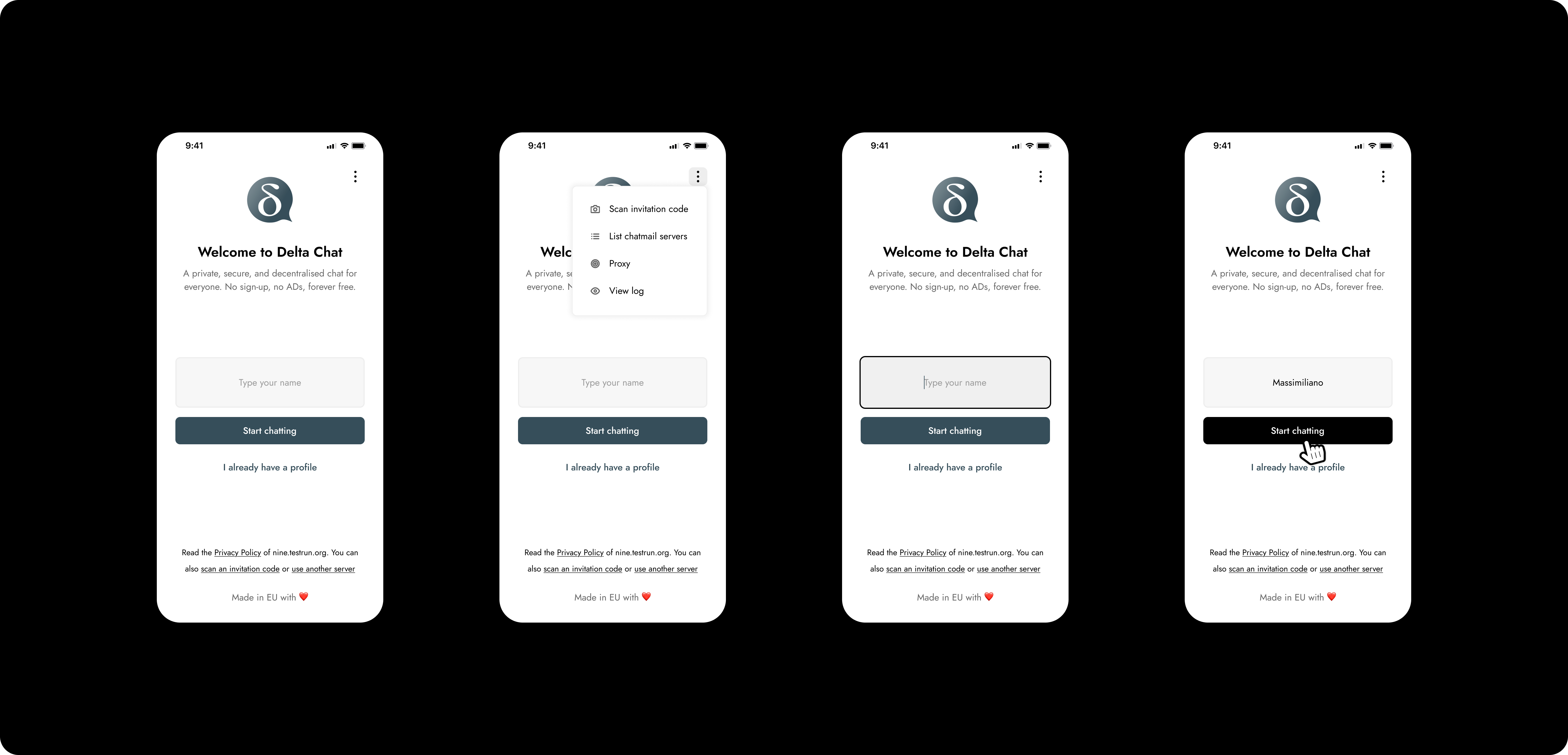
I believe the field to enter the name can me prompted since the beginning.
The “create new profile” button can give the wrong impression of a classic registration process. Moreover, it makes users clicking multiple times for an action that can be done at first.
I have played a bit on Figma and you can see below what I mean.
User download the app, open it, type a name, that’s it.
I wish to get your thoughts on it and happy to support your design team if you want.
@skamu, I think the UI you propose might well discourage decentralization by encouraging signups to the nine.testrun.org server. Especially with upcoming multitransport (one profile sends messages via multiple servers), my understanding is that this part of the UI will need changes anyway.
@link2xt, delighted to hear about mAuth. OAuth2 was striking example of standards capture. Seems it is functionally embraced-extend-extinguished at this point. An actual functional open standard would be much better than OAuth2.
@adbenitez, I was suggesting that if you live in an authoritarian country hostile to the US, an e-mail account with Microsoft might be an effective way to evade censorship. Sure, Microsoft gets your metadata, which is bad, your main threat is your own government. And your own government can’t block Microsoft’s servers without causing chaos.
I don’t think asking Google nicely to stop acting like a monopolist is worth the time. Asking governments to regulate interoperability stands a better chance of success, especially in Europe. It is after all a matter of international security; it is harder for authoritarian governments to control their populaces if there are more mailservers and domains sending messages, especially encrypted messages, and these messages are essential for the infrastructure of the internet. The PRC can pressure Google, but not thousands of volunteer-run servers.
So making it much easier to host a public mailserver is also good.
Making it easier to use Deltachat ubiquitously is also good. Am I right to think that mAuth is used when logging onto this Discourse server with Deltachat? Can other Discourse servers also enable this functionality?
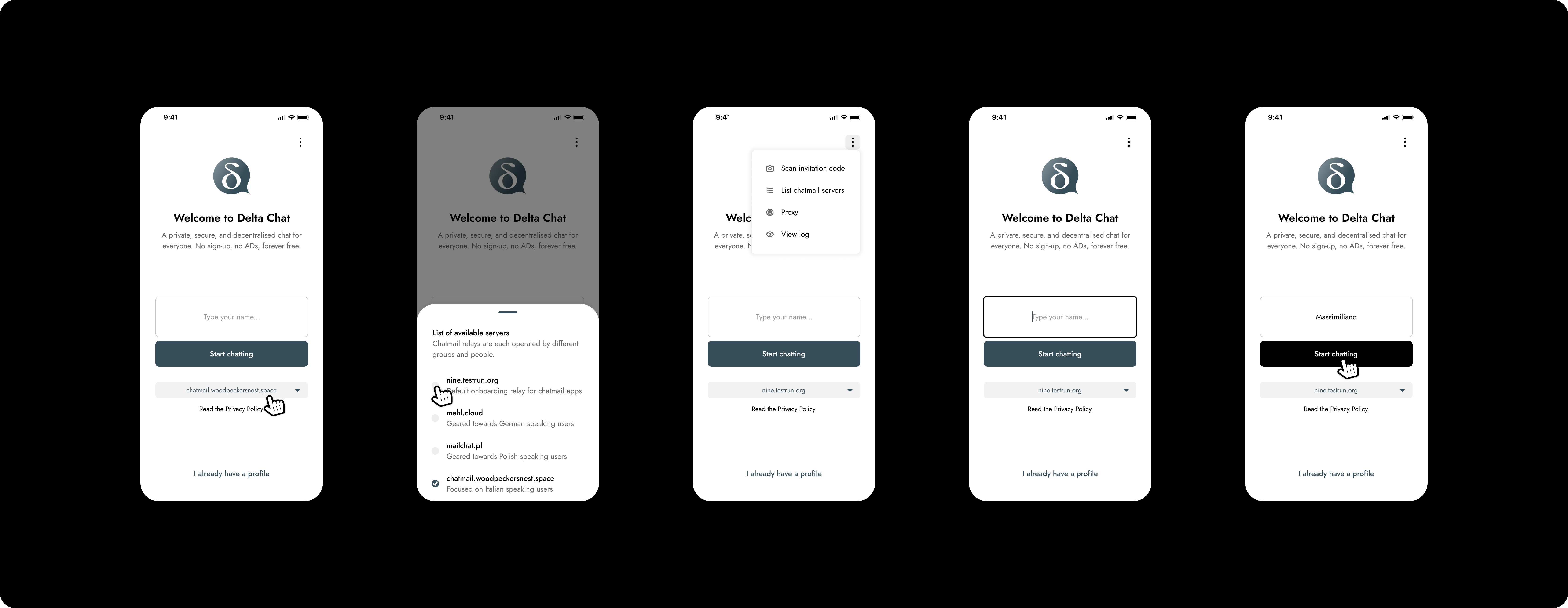
Thanks for your feedback, it is deeply appreciated, and you are spot on. I totally agree with you that “decentralisation” should be well highlighted.
See below an updated version of the wireframes.
Please, try not to care about the quality of the UI, it is just a quick draft.
From a UX perspective, the idea is to streamline the onboarding journey, so that users can type an alias straight away and start chatting… basically leveraging the awesome job that has been done in the backend.
Feel free to comment and again, more than happy to support your design team if needed.
While the current interface has a set list of servers (all of which some countries are blocking), it is also possible (if more obscure) to type in the domain of any Chatmail server and automatically create an account on it. Alternately, typing in the IMAP login credentials of any existing e-mail account works (even more obscure). And by default, all Chatmail servers publish an invite QR code, which if scanned into Deltachat creates an account on that server.